Category: Case Studies

  • Cloud Hosting vs VPS Hosting – Which One Should you Choose in 2025?

    Cloud Hosting vs VPS Hosting – Which One Should you Choose in 2025?

    Cloud hosting or VPS hosting? If you’re needing to have your website hosted on the internet, you may be overwhelmed at the choices available. Two popular choices for web hosting include cloud hosting and VPS hosting – but what is the difference, and which should you choose?

    In this post, we will explain what cloud hosting and VPS hosting are, what the differences are between these two hosting options, and show how to get started with VPS hosting.

    If you are in a hurry, you can jump directly to our VPS hosting vs cloud hosting comparison table ->

    What is Cloud Hosting?

    Cloud hosting is a type of web hosting service that uses a network of virtual servers to host websites and applications. Instead of relying on a single physical server, cloud hosting distributes resources across multiple interconnected servers, creating a scalable and flexible hosting environment.

    You can easily sign up for a cloud environment and take advantage of its more robust network of servers that are distributed around the globe.

    Traditional cloud hosting providers only used to provide basic services such as virtual servers and storage space, but modern cloud providers offer more advanced services – such as serverless functionality, hosted database, CDNs, DDoS protection, and more.

    Types of Cloud Hosting

    There are several types of cloud hosting services available, each of which caters to different needs and levels of control:

    1. Infrastructure as a Service (IaaS) provides virtualized computing resources over the internet where users have full control over the infrastructure, including operating systems and storage. For example, Amazon EC2, Google Compute Engine, etc.
    2. Platform as a Service (PaaS) offers a platform for developers to build, run, and manage applications. Here the cloud provider handles underlying infrastructure, allowing users to focus on deployment and management. Google App Engine and Heroku are both examples of PaaS.

    Top Cloud Hosting Providers

    If you want to host a website, there are several good cloud providers to choose from. here are the top three that we would recommend:

    1. Amazon Web Services (AWS):
      • Offers a wide range of cloud services
      • Highly scalable and customizable
      • Requires technical expertise to set up and manage
    2. Google Cloud Platform (GCP):
      • Provides robust infrastructure and advanced tools
      • Known for its strong performance and global network
      • Provides powerful dashboard for monitoring
    3. DigitalOcean:
      • User-friendly interface and straightforward pricing
      • Popular among developers and small to medium-sized businesses
      • Provides optimized WordPress droplets

    Pros of Cloud Hosting

    Even the biggest of companies these days are moving their websites to cloud hosting.

    But why?

    What are the main factors that make cloud hosting such an appealing option for so many businesses?

    1. Scalability: If your website goes viral, you can easily adjust resources based on traffic and demand with little more than a moment’s notice.
    2. Reliability: Cloud providers often provide redundant power and network connectivity to ensure especially high uptime.
    3. Performance: Cloud providers make it possible to host websites closer to end users, which can lead to faster loading times.
    4. Flexibility: The wide range of cloud hosting providers means that there is tremendous choice between many different service models.
    5. Cost-effective: If you are running a small website, purchasing your own servers can be expensive. With cloud hosting, you pay only for the resources you use.

    Cons of Cloud Hosting

    Although Cloud hosting is incredibly popular today, there are a few things you should be aware of before you sign up:

    1. Complexity: A cloud environment can be challenging to set up and manage for non-technical users.
    2. Potential security concerns: If the cloud server is not configured properly then personal data can be compromised.
    3. Dependency on internet connectivity: While the cloud is great for hosting websites, it requires a stable internet connection to work. If you need your data to be available even during a network outage, then cloud is not the right option for you.
    4. Possible vendor lock-in: Cloud providers make it easy for you to sign up to new services, but make it extremely difficult to move to another cloud provider.
    5. Costs can escalate: With the advent of serverless computing, it is easier to lose track of your bills. In some instances, users have even reported getting billed for hundreds of thousands by cloud providers.

    What is VPS Hosting?

    VPS (Virtual Private Server) hosting is a type of web hosting that uses virtualization technology to provide dedicated (private) resources on a server that’s shared with multiple users. It sits between shared hosting and dedicated hosting in terms of cost and performance.

    In a VPS environment, a physical server is divided into multiple virtual compartments, each functioning as a separate server with its own operating system, dedicated resources (CPU, RAM, storage), and full root access.

    This allows for greater control, customization, and performance compared to shared hosting, while being more cost-effective than dedicated hosting.

    Types of VPS Hosting

    There are several types of VPS hosting available, catering to different needs and levels of management:

    1. Managed VPS Hosting: In this case, the hosting provider handles server management, updates, and security. It is ideal for users who lack either technical expertise, or time for server administration, and often includes features such as automatic backups and 24/7 support.
    2. Unmanaged VPS Hosting: In this hosting, users have full control over the server and are responsible for all management tasks. It is typically less expensive than managed VPS hosting but requires technical knowledge to maintain the server.

    Suggested read: What Is Managed WordPress Hosting & Do You Need It?

    Top VPS Hosting Providers

    If you are looking for reliable hosting providers, we would suggest that you can’t go wrong with any of the following:

    1. Linode:
      • A trusted VPS provider with a high reliable servers
      • Offers high-performance SSDs and a global network
      • Provides both managed and unmanaged options
    2. Vultr:
      • Offers affordable servers with hourly billing
      • Provides a wide range of operating systems and locations
      • Known for its user-friendly control panel
    3. Servebolt:
      • Offers managed VPS hosting for WordPress websites
      • Provides free server management and updates
      • Known for its reliable support and first party WordPress plugins

    Suggested read: Self-Managed or Managed Hosting: Which One is Right for You?

    Pros of VPS Hosting

    1. Dedicated resources: When you request resources from cloud providers, they can sometimes refuse you if there are no servers available. With VPS hosting, you are guaranteed CPU, RAM, and storage allocation throughout the duration of your contract.
    2. Root access: On a VPS server, you get full control over the server environment to configure it as you like.
    3. Cost-effective: VPS hosting often has a fixed monthly cost, and usually works out as being more affordable than dedicated hosting.

    Cons of VPS Hosting

    Before you sign up for VPS hosting, you should learn about following risks:

    1. Technical knowledge required: With a VPS server, you need to have technical knowledge for configuring it properly, especially for unmanaged VPS.
    2. Resource limitations: Unlike cloud hosting, resources on a VPS server are not instantly scalable, which means that you need to plan weeks (or even months) ahead of time should you need to increase or decrease your server resources.
    3. Responsibility for security: If you are running an unmanaged VPS, you will need to handle security incidents and configure firewalls to protect your server from cyber attacks.
    4. Potential noisy neighbor effect: While it is very unlikely, there is a small possibility that your website may suffer if another tenant on your physical server is consuming a lot of resources.

    The Differences Between Cloud Hosting vs VPS Hosting

    Here’s a comprehensive, side-by-side comparison of Cloud Hosting and VPS Hosting:

    Feature

    Cloud Hosting

    VPS Hosting

    Infrastructure

    Distributed across multiple servers

    Single server divided into virtual compartments

    Scalability

    Highly scalable, often in real-time

    Limited scalability, may require downtime

    Performance

    Variable, depends on current resource allocation

    Consistent, based on allocated resources

    Flexibility

    Highly flexible, easily add/remove resources

    Flexible within allocated resources

    Security

    Shared responsibility model

    User or host responsible, depending on management type

    Support

    Varies, often includes managed services

    Varies, from fully managed to self-managed

    Reliability

    High, due to distributed infrastructure

    Good, but dependent on single physical server

    Availability

    Very high, often with multi-region redundancy

    High, but typically tied to a single data center

    Cost

    Pay-as-you-go, can be more cost-effective for variable workloads

    Fixed monthly cost, predictable billing

    Suggested read: How To Host Multiple Websites On One Server | Ultimate Guide

    VPS or Cloud Hosting – Which One is Right for You?

    Choosing between Virtual Private Server (VPS) hosting and cloud hosting depends on a number of factors, including scalability, performance, cost, and specific use cases. Both options have their own advantages, and each can cater to different needs.

    • Choose VPS hosting if:
      • You have a predictable workload and need dedicated resources at a lower cost.
      • You require more control and customization over your server environment.
      • You are looking for stable and consistent performance without the need for frequent scaling.
    • Choose cloud hosting if:
      • You anticipate varying workloads, and need the ability to scale resources up or down easily.
      • High availability and reliability are critical to your operations.
      • You prefer a flexible pricing model and are comfortable with managing a more complex hosting environment.

    Final Thoughts

    Choosing between VPS hosting and cloud hosting ultimately depends on your specific needs, technical expertise, and budget.

    Both options offer unique benefits tailored to different use cases, whether you’re a small business owner looking for cost-effective solutions, a tech startup founder needing scalable and reliable infrastructure, or a freelance developer seeking control and customization.

    Understanding the nuances of each hosting type will help you make an informed decision that more closely matches your own unique business goals and technical requirements. With the right hosting solution, you can ensure optimal performance, reliability, and scalability for your online presence.

    Ready to simplify your server management and streamline your hosting experience? Sign up for RunCloud today!

    RunCloud makes server management easier by allowing you to deploy and remove sites with just a few clicks on your own server, no matter what cloud provider you choose.

    FAQs on VPS vs Cloud Hosting

    Which one is cheaper: cloud hosting vs VPS hosting?

    The cost comparison between cloud hosting and VPS hosting isn’t straightforward, as it depends on various factors:
    Cloud hosting typically uses a pay-as-you-go model, which can be cheaper for variable workloads or websites with fluctuating traffic whereas VPS hosting usually has a fixed monthly cost, which can be more economical for stable, predictable workloads.

    Why is VPS hosting so expensive?

    VPS hosting isn’t necessarily expensive, but it can be pricier than shared hosting because you’re allocated a specific amount of CPU, RAM, and storage. The higher cost is due to the superior performance, resources, and control you get compared to shared hosting.

    Is AWS cheaper than VPS?

    AWS (Amazon Web Services) isn’t necessarily cheaper or more expensive than traditional VPS hosting – it depends on your specific use case:
    For variable workloads or applications that need to scale quickly, AWS can be more cost-effective due to its pay-as-you-go model.
    For stable, predictable workloads, a traditional VPS might be cheaper due to its fixed pricing.
    AWS offers more services and features, which can add to the cost but also provide more value.

    What is the difference between storage VPS and cloud VPS?

    Storage VPS: Typically a traditional VPS with larger storage allocations, often uses local storage for better I/O performance, ideal for applications requiring large amounts of data storage..
    Cloud VPS: Part of a distributed cloud infrastructure, may use network-attached storage for better flexibility, better for applications needing flexible resources and scaling.

    Does Amazon offer VPS?

    Amazon doesn’t offer traditional VPS hosting, but they provide similar services through Amazon EC2 (Elastic Compute Cloud), which is part of AWS.
    EC2 instances are virtual servers in the cloud that function similarly to VPS, but with the added benefits of cloud infrastructure, such as easy scaling and pay-as-you-go pricing.

    Does Google Cloud have VPS?

    Google Cloud doesn’t offer traditional VPS hosting. Instead, they provide Google Compute Engine, which is a virtual machine instance in the cloud that functions much like a VPS, but with the advantages of cloud infrastructure, including flexible scaling and usage-based billing.
  • Self-Managed or Managed Hosting: Which One is Right for You?

    Self-Managed or Managed Hosting: Which One is Right for You?

    Choosing a hosting plan for your website or application can be a daunting task. There are so many options and factors to consider, such as cost, performance, security, scalability, support, etc.

    How do you know which one is the best for your needs and budget?

    In this article, we will explain the pros and cons of two common types of hosting: self-managed and managed hosting.

    We will also introduce you to a better solution that combines the advantages of both: RunCloud.

    Read on to find out more about self-managed vs managed hosting and how RunCloud can help you with your web hosting needs.

    Self-Managed Hosting

    Self-Managed Hosting, sometimes also known as self-hosted WordPress, is a setup whereby a website runs on a web server that the user chooses and pays for. A self-hosted WordPress website gives the user more control and flexibility over their website, but also more responsibility for managing and maintaining it.

    To create a self-hosted WordPress website, you will need to:

    • Buy a domain name from a domain registrar
    • Get a hosting account from a suitable cloud provider
    • Configure DNS records
    • Manage SSL certificates
    • Periodically check for new updates or vulnerabilities in plugins or themes.

    These are the basic steps to create a self-hosted WordPress website.

    Pros of Self-Managed Hosting

    • Lower cost: Self-managed hosting is usually cheaper than managed hosting because the customer doesn’t have to pay for the additional services and features that the hosting provider offers.
    • More control: Managing hosting often gives the customer more control over the server and its configuration. The customer can customize the server according to their needs and preferences. They can also install any software or application that they want on the server.
    • Flexibility: This hosting allows the customer to change or upgrade the server as they wish. They can also scale the server resources up or down, depending on the demand and traffic of their website or application.
    • Customization: Customers can tailor the server to their specific requirements and goals. They can optimize the server for either performance, security, or functionality.

    Challenges of Self-Managed Hosting

    • Technical skills: Self-managed hosting requires you to have technical skills and knowledge to manage and maintain the server. You will have to deal with complex tasks such as installation, monitoring, and troubleshooting. You also have to be familiar with the underlying operating system and the software that you use on the server.
    • Security: When choosing this option, you might be faced with more security risks because you are responsible for securing the server and its data. You must implement security measures such as firewalls, antivirus software, encryption, authentication, etc., and then continually monitor the server for any potential threats or attacks.
    • Maintenance: Self-managed hosting demands more time and effort to keep the server running smoothly and efficiently. You need to perform regular maintenance tasks such as backups, updates, patches, etc.
    • Support: If you host your website yourself, you won’t get any support from the hosting provider. You must rely on your own skills and resources to solve any problems or challenges that you might face on the server. The hosting provider may only offer basic support, or charge extra fees for advanced support.

    Managed Hosting

    Managed hosting is a type of hosting where the hosting provider takes care of most of the server management and maintenance tasks, such as installation, updates, security, backups, monitoring, and support. The customer only has to focus on their website or application and its content.

    The hosting provider also provides additional features and services, such as performance optimization, scalability, load balancing, caching, etc. The customer has less control over the server and its configuration, but also less hassle and risk.

    Benefits of Managed Hosting

    • Higher performance: Managed hosting providers work with thousands of websites, and often optimize servers for speed and efficiency. The hosting provider also uses advanced technologies such as caching, load balancing, CDN, etc. to improve the loading time and responsiveness of the websites or applications.
    • Reliability: Managed hosting provides more reliability than self-managed hosting because the hosting provider monitors the server for any issues or errors – and fixes them promptly.
    • Security: The hosting providers often work with a team of security experts that implements security measures such as firewalls, antivirus software, encryption, authentication, etc.
    • Support: You can easily get 24/7 technical support by contacting the hosting provider via phone, email, chat, ticket system, etc. Good hosting providers also provide documentation and tutorials to help the customer with their website or application.

    Drawbacks of Managed Hosting

    • Higher cost: Managed hosting is more expensive than self-managed hosting because the customer has to pay for the additional services and features that the hosting provider offers. The customer may also have to pay extra fees for exceeding limits or using additional resources on their plan.
    • Less control: You will get less control over the server and its configuration than self-managed hosting. You must also follow the rules and restrictions that the hosting provider sets for their plan.
    • Vendor lock-in: This is one of the major problems with managed hosting. A lot of hosting providers try to “vendor lock-in” the customer by forcing them to use a proprietary solution for their website.

    This is concerning because you may face difficulties in the future should the company remove a certain feature or change the pricing plans. Increase in hosting costs might tempt you to switch to another hosting provider but then you will lose some features or functionality that are specific to their current hosting provider or plan.

    • Compatibility issues: Managed hosting may cause compatibility issues for the customer because they have to use the software or applications that are compatible with their hosting provider or plan. The customer may not be able to use some software or applications that they want on their website or application.

    For example, If you rely on a legacy version of PHP for a certain application and the vendor chooses to phase that out, then your options are limited. You may have to update your plugin or find an alternative one that works with the newer version of PHP. In either case, you will need to solve a problem that was created by your hosting company.

    RunCloud: The Best of Both Worlds

    If you are fretting over which hosting option to choose, then worry not – RunCloud brings you the best of both worlds.

    RunCloud is a platform that lets you host any web application on your own server, whether it’s on a cloud provider or a private datacenter.RunCloud gives you the benefits of a managed service without the drawbacks of vendor dependency.

    With RunCloud, you can instantly deploy new WordPress websites with a few clicks, update DNS records with Cloudflare integration, and enable page caching with the RunCloud Hub plugin.

    You can also choose from different server types, such as Nginx+Apache, OpenLiteSpeed, or Docker. Furthermore, you can use the HTTP/3 protocol on your websites for faster loading.

    RunCloud provides you complete access to your server, application, database, and even underlying operating system at all times – there is no vendor lock-in. You can also back up your applications to any storage location you prefer, such as AWS S3, DigitalOcean Spaces, SFTP storage, etc.

    RunCloud is user-friendly: you can manage your servers from a dashboard without needing Linux skills. But you also have the option to log in to your server via SSH as the root user to customize your server settings if you want. You can also use the Developer API to control your servers programmatically.

    RunCloud ensures that your server and web application are secure and protected from any threats or attacks. We automatically update your server and apply security patches to keep it up to date and safe.

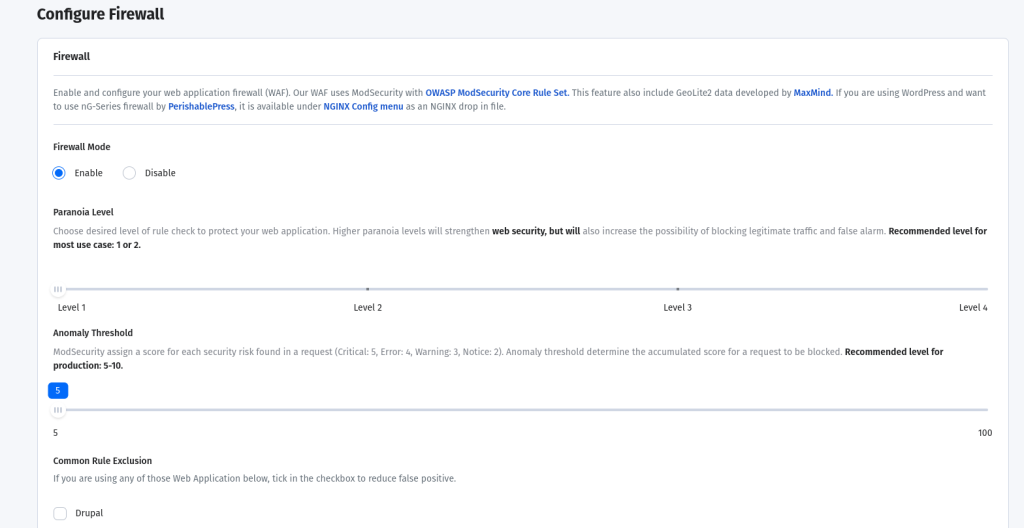
    RunCloud also has a built-in firewall and configures Fail2Ban on your server to block automated attacks. Best of all, you can configure Slack, email, and Telegram notifications for key actions on your server – such as ssh login, backup failure, etc., ensuring you stay informed and alert.

    Final Thoughts

    In this article, we have explained the pros and cons of self-managed and managed hosting for your website or application. Here are some recommendations or tips for choosing a hosting plan that suits your needs and budget:

    • Consider the type and size of your website or application, the traffic volume and growth rate, and the features and functionality required. These factors will determine the amount of server resources and services that you need.
    • Compare the cost of different hosting plans based on the criteria such as storage space, bandwidth, CPU cores, RAM, backups, SSL certificates, domains, etc.
    • Weigh the benefits and drawbacks of each hosting option in terms of performance, reliability, security, scalability, and support. You can use lists or bullet points to summarize the pros and cons of each option.

    Givе RunCloud a tеst drivе and discovеr its capabilities in meeting your web hosting requirements. RunCloud lets you to еffortlеssly host any wеb application on your sеlf-ownеd sеrvеr, whеthеr it’s hostеd by a cloud providеr or within a private datacenter.With RunCloud, you gain the advantages of a managed sеrvicе while avoiding the limitations of vendor rеliancе. Sign up for RunCloud today!

  • WordPress Multisite vs. Multiple Sites – Which Is Better?

    WordPress Multisite vs. Multiple Sites – Which Is Better?

    WordPress Multisite is a feature of WordPress that allows you to create and manage multiple websites from a single WordPress installation. It can be a powerful and convenient solution for website owners who want to expand their online presence and reach more customers.

    But how does WordPress Multisite compare to setting up separate WordPress sites for each of your domains?

    Whether you’re a blogger, a small business owner, a large corporation, or a university, you might benefit from using WordPress Multisite to create and run multiple websites with ease.

    In this article, we’ll explain what WordPress Multisite is and how it works. We’ll also explore the advantages and disadvantages of using it compared with using multiple WordPress sites.

    We’ll help you understand the differences between the two approaches and how they affect your website performance, security, maintenance, and scalability. By the end of this article, you’ll be able to decide which option is better for your needs and goals.

    What Is WordPress Multisite?

    WordPress Multisite is a feature that allows you to run and manage multiple websites on a single WordPress installation. In this setup, the sites are not standalone, i.e. they are all interconnected in one way or another. This means that you can create and manage a network of websites from a single dashboard.

    Usually, there is one main site, sometimes also called root site, which is managed by the network administrator. This administrator can create as many sites as needed, and grant access to other users to manage one or more of those sites. This can be configured in such a way that each site has either its own subdomain, or has its own directory.

    One of the biggest advantages of using WordPress Multisite is centralized management. With this approach, you can manage all of your websites from one dashboard. This makes it easy to update plugins, themes, and core WordPress files across all of your sites simultaneously.

    Additionally, you can manage user roles and permissions across your entire network, which saves considerable time and effort.

    Since you’re only using one WordPress installation, a Multisite Network is cost-effective. You don’t need to purchase additional hosting for each site. This can reduce operating costs significantly, especially if you’re managing a large number of sites.

    Since you are using only one server for all your sites with WordPress Multisite, it will be a lot easier to manage and update it. Instead of securing each server separately, you can focus your efforts on hardening one server and keeping it updated. Using a common server saves time and reduces the risk of conflicts that might occur when updating sites individually.

    Multisite networks allow you to build consistency in your brand and design, giving it a more professional look. The ability to update plugins or themes across all websites from a single dashboard also saves a great deal of time, and ensures that your branding and design remain consistent.

    However, while WordPress Multisite has many advantages, there are some potential drawbacks to consider as well. For example, some plugins may not be compatible with WordPress Multisite, and you may need to use separate plugins for certain functionality.

    Additionally, if one site on your network experiences an issue, it can potentially affect all of the sites on your network.

    With that being said, WordPress Multisite is ideal for institutions where each individual needs their own websites. For example, in a university, all professors can have their own website where they publish their course curriculum. Similarly, in a blog about sports, a different site can be given to different people, each with an expertise in a different sport.

    If you want to learn more, read our guide on How to Install and Setup A WordPress Multisite Network.

    Using Multiple Sites in WordPress

    One way of creating and managing multiple websites is to use separate WordPress installations for each of them. This means that each website will have its own database, files, plugins, themes, and settings. If you prefer to have more control over each of your websites, then using multiple sites might be a better option.

    The primary reason for using multiple sites is more control over each individual site. Since each has its own installation, you get more control over the site’s design, functionality, and content. This can be especially important if you have specific requirements for each of them.

    Using multiple WordPress sites is a great option for businesses who want to create niche affiliate marketing websites. This way, you can have more control and flexibility over each site, and tailor it to your specific niche and audience. You can also use different themes, plugins, and settings for each site to optimize them for conversions. If you’re looking for a better way to run multiple niche affiliate marketing websites, this approach is for you.

    When using multiple WordPress sites, you have the option to either host them on the same server, or on different servers. This gives you more flexibility and control over your hosting resources and performance. Since these are independent sites, each site administrator can choose any plugins or themes that they want.

    When you are running sites on separate servers, you have the flexibility to scale server resources for each site depending upon its needs. This can help ensure that each site is running optimally, and doesn’t experience any performance issues.

    Moreover, having sites on different servers isolates them. If one of your sites gets hacked, you might have a fighting chance to save all the other sites. You can even take extreme steps such as taking down the entire website without worrying about its impact on other sites.

    Using multiple WordPress sites can have some benefits, but it also comes with some challenges. You may need to spend more time and resources managing multiple installations, and may need to hire more technical staff. You may also have to buy separate licenses for some themes or plugins for each site, depending on the developer’s policy.

    In contrast, with a multisite network, some plugins such as PublishPress may allow you to use a single license for the whole multisite network, while other plugins such as WPForms or The Events Calendar may require you to purchase a multisite license or a license for each site in the network. You should always check the terms and conditions of the theme or plugin before using it on multiple sites.

    How to Choose Between Multisite and Multiple Sites

    After considering the two approaches, it’s clear that both have their advantages and disadvantages. Let’s take a look at additional factors that you should consider when deciding to host your website.

    How Related Are the Sites?

    A major factor to consider is how related the sites are to each other. A multisite network only makes sense if all your sites belong to an umbrella organization or follow a common objective.

    For example, you might use a multisite network to create sites for different departments, locations, or products of your business. Or you might use it to create sites for different courses, faculties, or student groups at your school.

    However, if you plan to host vastly different content from different sources and audiences, a multisite network is not the right choice.

    For example, if you want to create sites for different clients, niches, or projects that have nothing to do with each other, a multisite network will not be beneficial. In fact, it might cause more problems than it solves. The sites will share the same database, files, plugins, and themes, which can create conflicts and potentially present security risks. The sites will also be harder to manage and maintain as the network grows.

    Budget

    The cost of running the sites can vary dramatically depending on your setup, such as the hosting plan, the number of sites, and the resources they consume. If you are using a cloud provider, they will charge you separately for each server, storage, network traffic, and IP address. This can add up quickly if you have many sites on different servers.

    If you want to save some money, you might consider hosting all of the sites on one server and sharing the resources. You can do this by using either a multisite network or multiple sites. However, keep in mind that a multisite network can only run on one server, while multiple sites can be moved to different servers later if needed.

    Scalability

    Another key factor to consider is how well your sites can handle traffic spikes. If you use a multisite network, you’ll have to share the same server resources for all the sites in the network.

    This means that if you need to scale your server up (or down), you will affect all of the sites at once. But if you use multiple sites on different servers, you can easily scale up individual sites without impacting the performance of other sites.

    How Often You Need to Create New Sites

    If you will need to frequently set up more sites in the future, WordPress Multisite is the right choice for that, as it makes adding new sites easy and doesn’t require creating new WordPress installations from scratch.

    Maintenance

    If you use multiple WordPress sites, the process of managing them will become more difficult as you add more sites. You will have to log in to each site separately, update the plugins and themes, and perform backups and security checks.

    Moreover, if you host your sites on different servers, you might accidentally delete a server that hosts a site that you still need.

    WordPress Multisite can be easier to maintain because you can manage all of your sites from one dashboard. You can update the plugins and themes for the entire network, perform network-wide backups, and monitor the security of all your sites.

    Control and Functionality

    If you want to have full control over each site and customize it to your specific needs, you might prefer to use separate WordPress installations for each site. This way, you or the site administrator can make changes to the site without affecting other sites. You can choose the plugins, themes, and settings that work best for your site and its audience.

    However, if you want to have a more convenient and efficient way to manage all of the sites at once, you might want to use WordPress Multisite. This feature allows you to create and run multiple sites from a single WordPress installation and dashboard. You can access all the sites from the My Sites menu and perform network-wide tasks such as updating plugins, themes, and WordPress core.

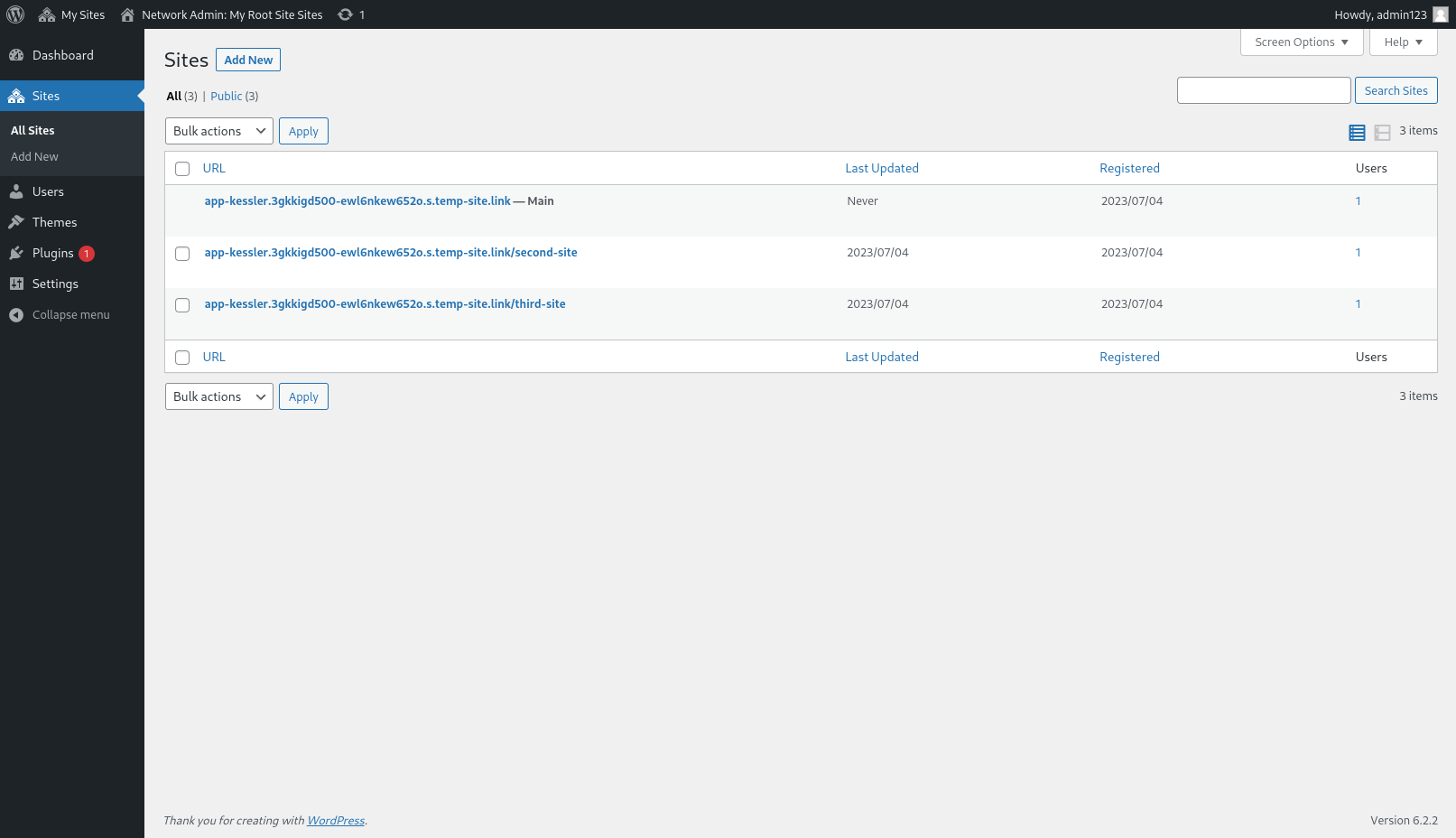
    Here are some screenshots that show what a multisite dashboard looks like and how you can perform basic maintenance tasks:

    Viewing all websites on WordPress Multisite network

    This is the multisite dashboard, where you can see an overview of your network and access the network settings.

    In the My Sites menu, you can see all of the sites in your network and quickly switch between them.

    Installing themes on a WordPress network

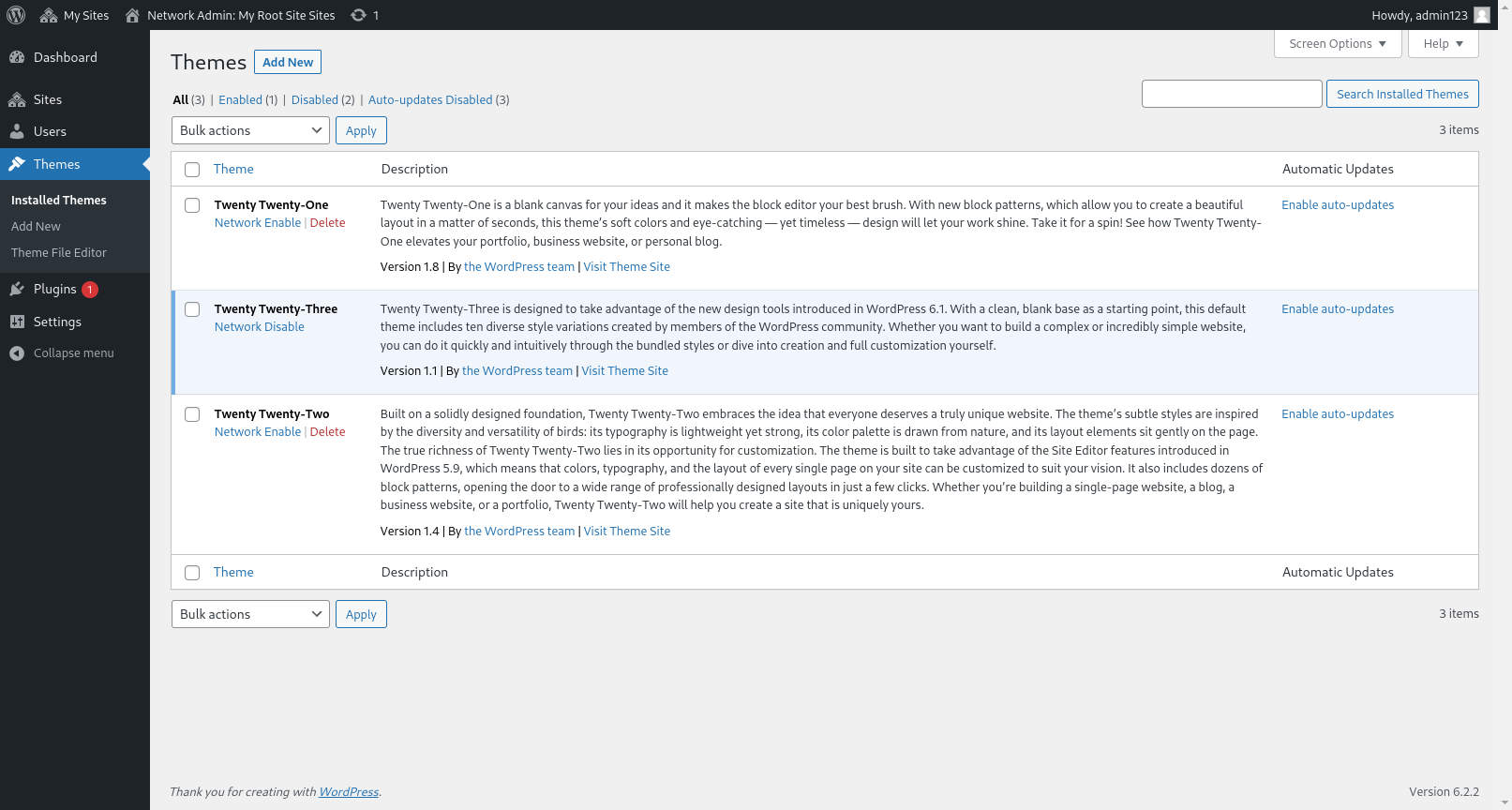
    This is the Network Themes screen, where the admin can update and install themes for the entire network.

    Conclusion

    As you can see, WordPress offers you two options for creating multiple websites – a Multisite Network or separate installations. Each option has its pros and cons, so you need to consider your needs and goals before choosing one.

    Whether you want to run a large network of sites, or just a few, WordPress has you covered.

    After you have made the decision, you can continue learning – by reading our other articles on WordPress:

    1. How To Install WordPress With RunCloud | Step-By-Step Guide
    2. How to Install and Setup A WordPress Multisite Network
    3. Load Balancing For WordPress — What It Is & How It Works
    4. Install And Configure Object Cache Pro for WordPress

    RunCloud is the ultimate solution for managing multiple WordPress websites or WordPress Multisite networks.

    With RunCloud, you can control all of your servers and web apps from a single dashboard, saving you time and hassle. You can also enjoy features such as automated backups, security scans, performance optimization, and more.

    Don’t miss this chance to take your WordPress management to the next level. Sign up for RunCloud today!

  • How InstaWP Scaled The Leading WordPress Sandbox with RunCloud

    How InstaWP Scaled The Leading WordPress Sandbox with RunCloud

    InstaWP is the leading provider of what can most simply be described as disposable WordPress websites and it is used for everything from testing to staging and demos (for WordPress plugins and themes). Behind the scenes, they chose to power their platform with RunCloud using our API. 

    For Those Yet To Hear About InstaWP – What Is It? And What Led You To Build It?

    In short, InstaWP is a WordPress sandbox service. What this means, and the use cases & scenarios that it applies to are extremely varied.

    For example, we recently learned that the FooEvents team had been relying on InstaWP as a part of their support process.

    By using InstaWP, they were able to quickly create instances that enabled their team to explain installation issues to their customers with far greater ease and effectiveness.

    More recently, extendify.com and newsletterglue.com have started using InstaWP to provide more effective ways to demonstrate their solutions. Of particular interest is that InstaWP has received seed funding from Automattic (giving them a percentage of future equity under a SAFE (Simple Agreement for Future Equity).

    What led us to build the platform was very much out of our own needs. We wanted an easy way to deploy single-use WordPress sandbox environments – whether that was for testing, validating an idea before pushing something to production, debugging issues, or building a site for a client, among several important needs.

    We (at ExpressTech) wanted to make a platform that would simplify a whole range of processes that were taking place in our organization, and which we knew were also highly relevant to a wide range of other users in the WordPress space (as well as organizations similar to ours).

    Building InstaWP – The Challenges Faced

    As we began development on the platform when it was still an internal project, the biggest challenge we faced was not wanting to reinvent the wheel when it came to server deployment and management. Realistically, that would have extended the development time, increased costs, as well as raised maintenance costs of the platform as a whole to the point where we would likely not have pursued the development.

    It was at this stage that we began to explore the potential ways we could use RunCloud’s API to negate the need to bake the deployment scripts into our own systems. As it turned out, this ended up being relatively straightforward to accomplish.

    Shortly after finding RunCloud, we were confident that the implementation would be suitable, and would work exactly as we wanted it to. This gave us the confidence to take InstaWP to market much, much faster than we would have (and could have) prior to using RunCloud with our free offering.

    What Made RunCloud The Right Solution For InstaWP

    Although there are many platforms that try to accomplish something similar to what RunCloud does, we were very quickly certain about our choice to use RunCloud to build InstaWP. The fact that they’ve been a leader in the industry for years as a reliable service provider (i.e., not offering lifetime deals, compromising quality, etc.) aligned with our values, and this made us feel confident when making the choice that we would be in good hands.

    Similarly, upon connecting with the team, we received great help, support, and feedback that again made the entire process of building InstaWP more enjoyable.

    Suggested read: How to create WordPress Staging site

    Upcoming Plans & Where You Can Learn More About InstaWP

    RunCloud gave us the perfect start with its simple API and robust infrastructure to provision instances. We had to write some WP-specific APIs ourselves, like Magic Login, DB Editor, Code Editor, etc., but from a provisioning standpoint, RunCloud had us covered.

    To scale, we are looking to create our own backend of provisioning, with the sole reason being that our systems will be designed towards having short-lived sandbox environments, whereas RunCloud is meant for production-level sites.

    And eventually, the goal is to integrate with RunCloud (as well as hosting providers) to provide a way to easily push from InstaWP environments over to production sites. In a way, going full circle with an integration with the solution our platform was first powered by. The first phase of this has started: